See who sent the last message in your conversation list
Each conversation now starts with who sent the last message, such as You, a teammate, your AI agent's name, Sequence or Note.
Read inBahasa Melayu中文
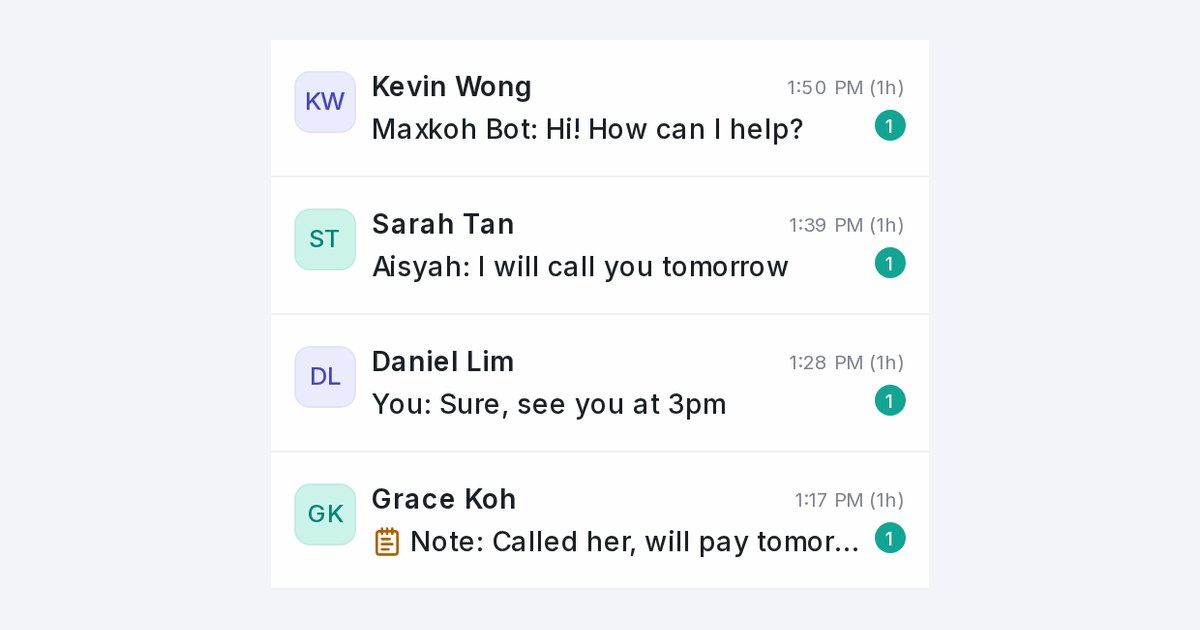
Mampu AI now shows who sent the last message on every row of Conversations, the way WhatsApp does, so you can tell at a glance whether a customer is waiting on a person, your AI agent or an automatic message.
How do I see who replied last in Mampu AI?
- Open Conversations.
- Read the start of each row's last message: You:, a teammate's name such as Aisyah:, or your AI agent's name such as Maxkoh Bot:.
- Rows with no label are messages from the customer.
What labels can a conversation show?
- You: for your own replies. A reply typed in the connected phone app or Facebook Page inbox reads WhatsApp sync:, Instagram sync:, Facebook sync: or TikTok sync:, since the app doesn't say who typed it.
- Sequence: for follow-up sequences and booking reminders, Broadcast: for blasts, and Automation: for automation rules, automatic replies to comments and other automatic messages.
- Note: with a notepad icon for private notes. The same notepad icon marks private notes inside the conversation and in search results.
- Each teammate sees their own replies as You: and everyone else's by name.

