Send each inbox down its own route in a flow agent
Add an Inbox condition to a route. Customers on that inbox skip the question and go straight to it, while other inboxes still offer it as a choice.
Read inBahasa Melayu中文
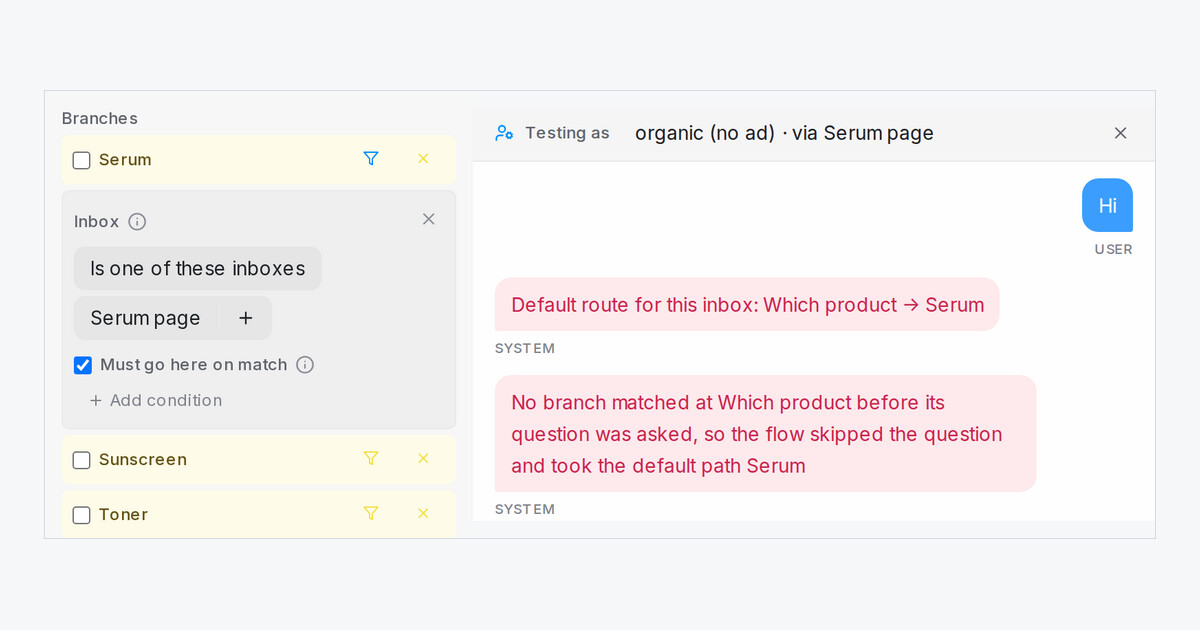
When one flow agent answers several inboxes, such as a Facebook page for each product, every customer used to get the same opening question. A new Inbox condition on a Condition step's route lets each inbox go its own way.
How do I set it up?
Click the filter icon on a branch, press Add condition and pick Inbox. Choose Is one of these inboxes or Is not one of these inboxes, then pick the inboxes from the list. Renaming an inbox later keeps the rule.
What does "Must go here on match" do with an inbox?
With the tick, the route becomes the step's default for customers on those inboxes. A first message like "Hi" skips the question and goes straight to that route. A customer who asks for another product still gets it, an ad rule that sends its customers elsewhere still wins, and customers on your other inboxes can still pick the route from the usual choices. Without the tick, the route is only offered on the inboxes you chose.
How do I test it?
Open Scenario in the Playground and pick the Inbox. The chat notes which route became the default for that inbox, so you can check each page before going live.

