Send a flow step exactly as written, in two languages at once
A new step switch sends your message word for word, never translated, so one greeting can carry English and Malay for every customer.
Read inBahasa Melayu中文
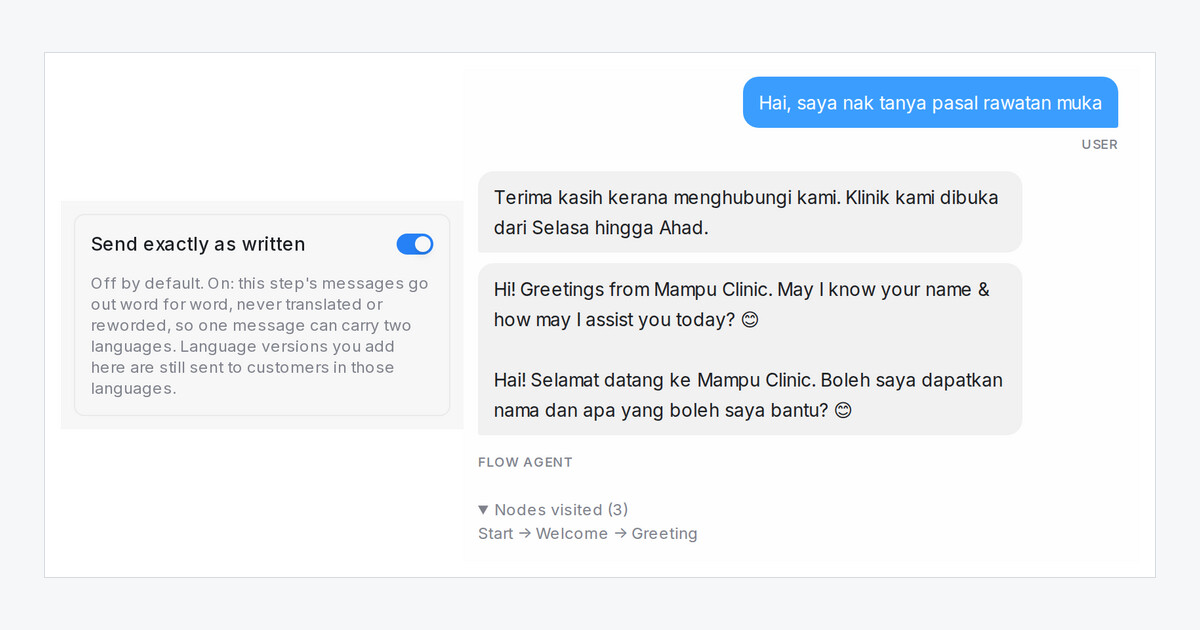
A flow agent translates each step into the customer's language as it sends it. That is usually what you want, but not for a message written in two languages on purpose, such as a greeting in English and Malay that tells customers they can reply in either. Now a step can go out exactly as you wrote it.
How do I send a step exactly as written?
- Open the flow agent in the designer and click the step.
- Write the message or question in both languages.
- Open Advanced settings, turn on Send exactly as written and press Save Changes.
The switch is on message, question, condition and end steps.
What changes for my customers?
- Every customer gets that step's text word for word, whatever language they write in, including its follow-up messages, ask-again lines and outside-business-hours version.
- Placeholders such as your customer's name are still filled in.
- A version you wrote on a language tab still goes to customers in that language, as written.
- Other steps are translated as before, so the rest of the conversation still follows the customer's language.

