Send every unmatched reply down a default path in a flow condition
Tick one branch of a Condition step as the default path and replies that match no branch continue down it, after the agent answers any question in them.
Read inBahasa Melayu中文
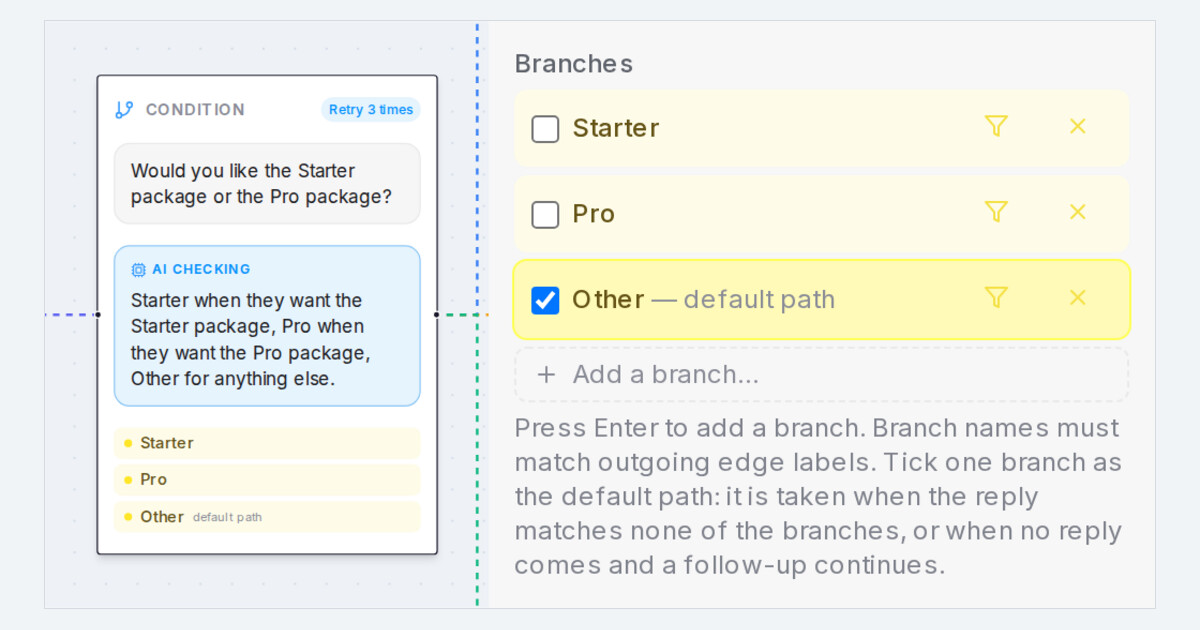
Mampu AI now lets a Condition step in Flow Agents carry a default path. Tick one branch, such as Other, and a customer whose reply fits none of the branches continues down it instead of being asked the same question again. A question in that reply is answered first, then the flow carries on.
How do I set a default path on a condition in Mampu AI?
- Open the flow agent, select the Condition step and find Branches in the step panel.
- Tick the branch that should catch everything else. The row reads default path, and the step's card shows the same badge.
- Click Save Changes and try a reply that matches no branch in the Playground.
What happens when a reply matches no branch?
- Any question in the reply is answered first; the customer is never asked the same question twice.
- A plain "ok" goes straight down it, and so does a first message that matches no branch: the step's question is then never asked.
- It is also taken when the customer never replies and a follow-up is set to Continue to the next step.
- The Playground says when it happened; the reply's footer in the conversation keeps the line under Default path.
- With no branch ticked, the agent asks the question again, as before.
- In the designer chat, say "anything else goes to Other" and the default path is set for you.

