Keep the AI inside one part of your flow with journeys
Mark a step as the start of a journey, see each journey as a cloud on the canvas, and keep the AI inside the journey the customer is in.
Read inBahasa Melayu中文
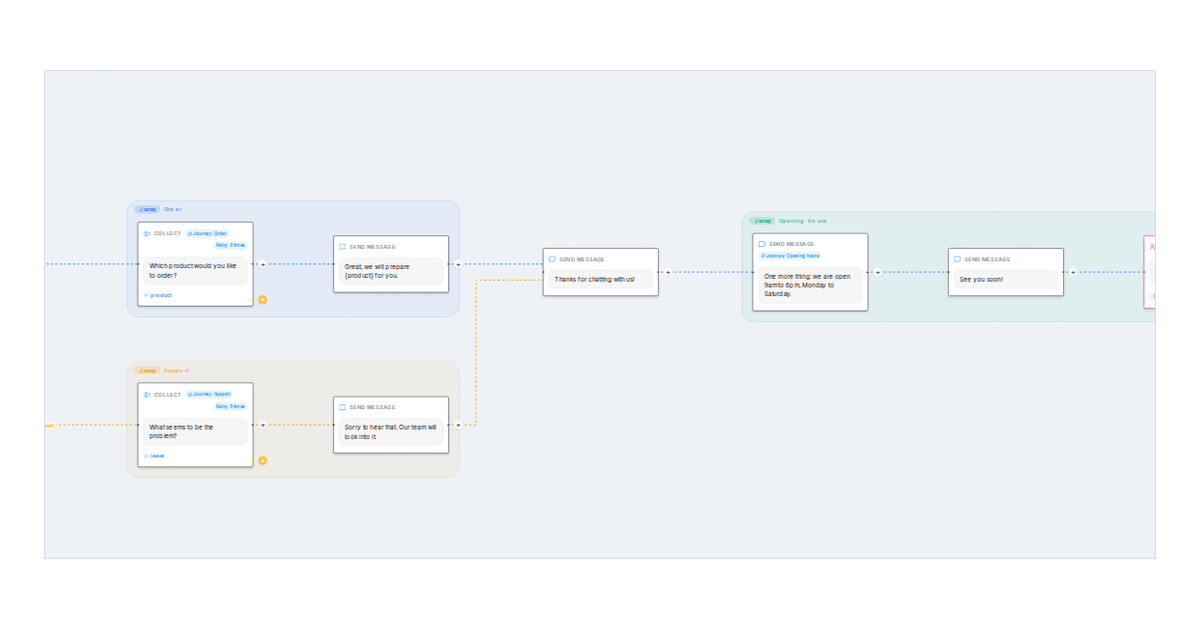
Mampu AI now lets you split a Flow Agents flow into journeys and keep the AI inside the one the customer is in. Each option of your first menu is already a journey, drawn as a cloud on the designer canvas, and you can start more journeys on later steps. A new agent setting decides whether the AI may move a customer from one journey to another.
How do I start a journey on a step in Mampu AI?
- Open the flow agent and click the step on the Designer canvas.
- Expand Advanced settings at the end of the step panel, switch on Starts a journey and press Save Changes.
- The step and every step after it, up to the next journey, now sit inside one cloud with the journey's name. Pressing a line and choosing Start a journey from the next step does the same.
What happens when the AI may not switch journeys?
- Flow AI can switch journeys sits under Advanced settings in the agent Settings and is on by default, so existing flows do not change.
- With it off, a customer who asks about another journey is answered in place and brought back to the current question instead of being moved.
- The lines you drew between journeys still work, and answers the customer already gave are shared across journeys.
- A journey never sits inside another one.

