Hide a flow step from the AI
Switch on Hide this step from the AI in a step's Advanced settings and the AI never uses that step in its replies. The flow still reaches it.
Read inBahasa Melayu中文
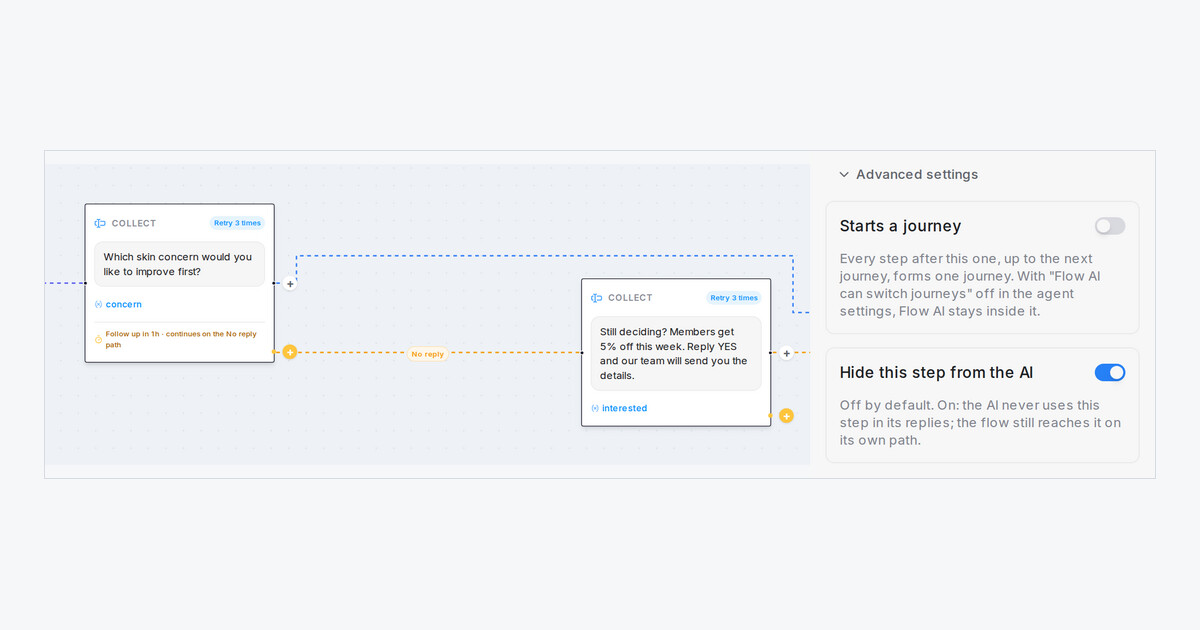
Some steps belong to one moment only. A member discount you offer to a customer who went quiet is a good example: you want it sent on the No reply path, not quoted to everyone who asks about prices. Each step now has a switch that keeps it out of the AI's answers.
How do I hide a step?
- Open your flow agent and click the step.
- Open Advanced settings at the end of its panel.
- Switch on Hide this step from the AI, then click Save Changes.
What changes for my customers?
- The AI never uses the step in its replies and never moves a customer to it by itself.
- The flow still reaches the step along its own lines, such as the No reply path, and sends it as written.
- A customer who asks about it at another step is treated like any question your flow has no answer for.
- The switch is off for every step until you turn it on, so your flows work as before. Start and End steps don't have it.

