See which chats are not a lead, with their own badge
Lead analysis now marks existing customers, staff chats, vendors, job seekers and spam with a Not a lead badge, and you can say who is never a lead for you.
Read inBahasa Melayu中文
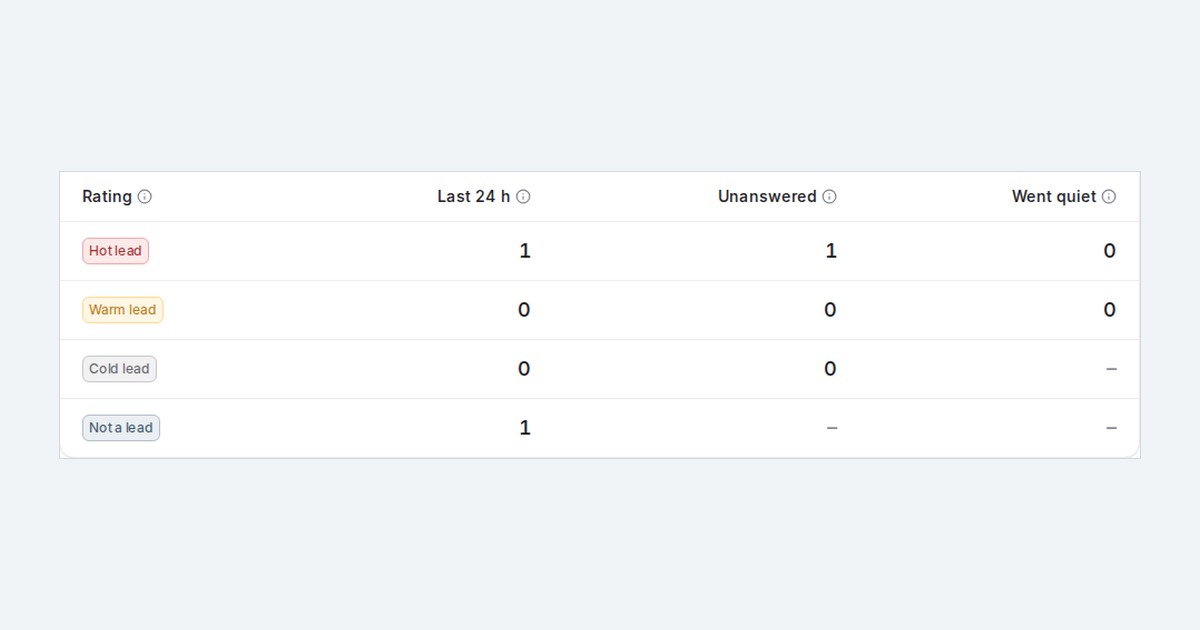
Mampu AI lead analysis now shows which chats are not sales enquiries at all. An existing customer asking about a delivery, a colleague, a supplier, a job applicant or a marketing blast gets a grey Not a lead badge instead of a lead category, so your hot, warm and cold counts hold only real leads.
How do I see which chats are not a lead in Mampu AI?
- Switch on Rate leads in this account under Settings → AI Monitoring → Lead analysis.
- Look for the Not a lead badge on a conversation. Hover it to see the kind: Existing customer, Staff or personal chat, or Vendor, job seeker or spam.
- Open Reports → Leads. The scoreboard ends with a Not a lead row counting those chats from the last 24 hours, and the morning email shows the same row.
Can I say who is never a lead for my business?
- Expand the Not a lead card under your lead categories and fill in Who is not a lead for your business? (optional), for example "suppliers, job applicants and partnership offers".
- You can also change the badge text and colour there.
- A customer who sends one short message that could be about what you sell still counts as a cold lead, not as Not a lead.

