See which FAQs your AI agent actually uses
Each FAQ in AI Knowledge now shows how many chats used it in the last 30 days, and you can sort by most used or list the FAQs nobody needed.
Read inBahasa Melayu中文
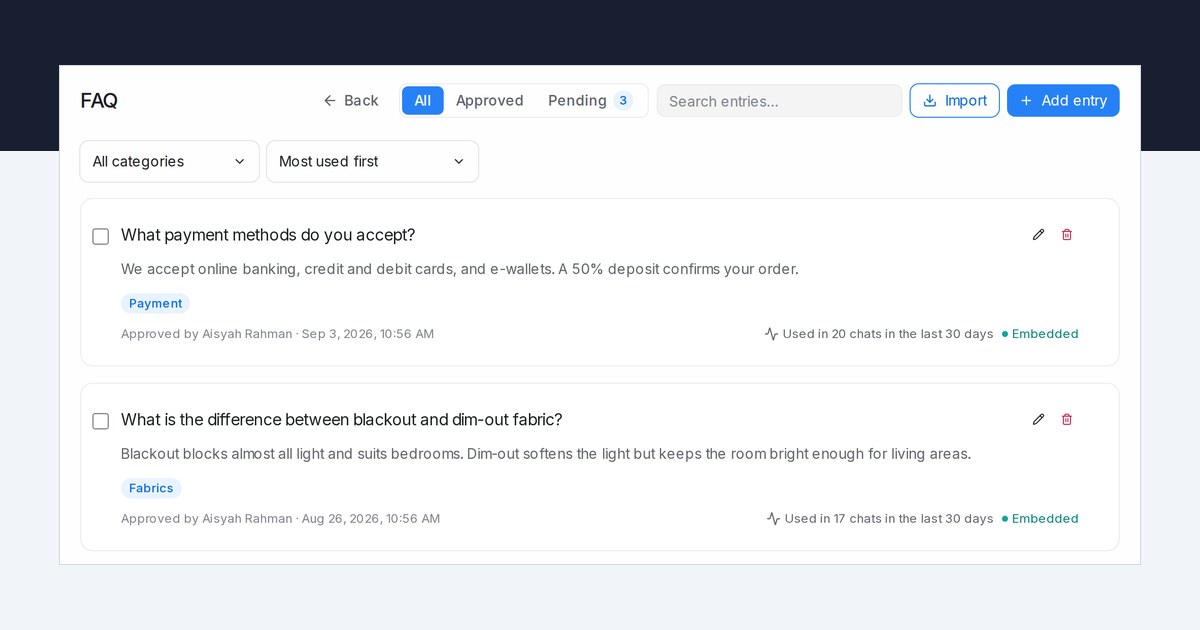
Mampu AI now shows how often your flow agents use each FAQ in AI Knowledge Hub. Every FAQ card says how many customer chats used it in the last 30 days, so you can see which answers customers need and which ones nobody asks about.
How do I see which FAQs my Mampu AI agent uses?
- Open Flow Agents → AI Knowledge Hub → FAQ.
- Read the line on each card: Used in 12 chats in the last 30 days or Not used in the last 30 days. Hover over it to see how many of those replies quoted the FAQ.
- In the usage menu next to the category menu, choose Most used first or Not used in 30 days.
What counts as a chat that used an FAQ?
- A chat counts when your live agent had the FAQ at hand while answering a customer in it. Test chats in the playground don't count.
- Each chat counts once, however often the FAQ came up in it.
- Pending drafts are never used until you approve them, so their cards show no usage line.
- The usage menu works with All, Approved, Pending, the category menu and search. Selecting all and clicking Delete under Not used in 30 days removes only the FAQs listed.

