See why each lead went cold, from reasons you can edit
Lead analysis now says why each quiet lead went cold, such as price or a question left unanswered, and quotes the chat line behind it.
Read inBahasa Melayu中文
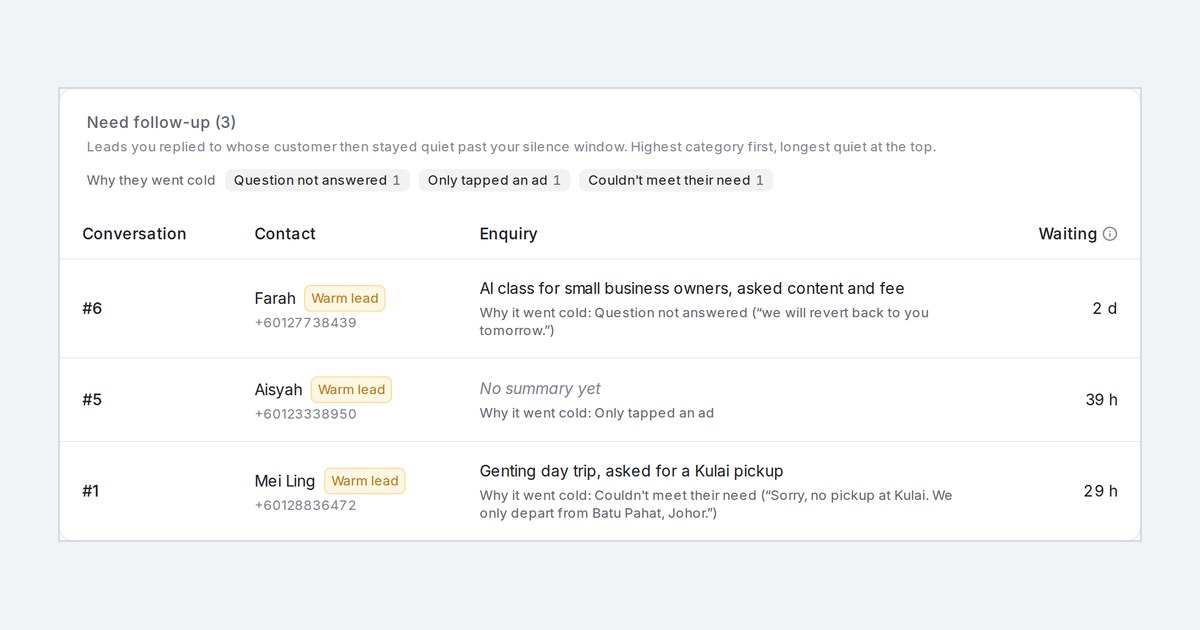
Mampu AI lead analysis now tells you why a lead went cold. When a lead goes quiet or the customer says no, AI Monitoring picks the most likely reason from your list and quotes the line from the chat that shows it, for every inbox it watches.
How do I see why a lead went cold in Mampu AI?
- Switch on Rate leads in this account under Settings → AI Monitoring → Lead analysis.
- Hover the lead badge on a conversation. Once the lead has gone cold, the tooltip ends with Why it went cold and the quoted line.
- Open Reports → Leads. Each lead in Need follow-up shows its reason, and Why they went cold counts the day's quiet leads by reason. The morning email shows the same.
Which reasons can a cold lead get, and can you change them?
- Eleven built-in reasons, such as Price, Couldn't meet their need, Details never sent, Booking not completed and Question not answered, for when your side never replied or never followed up.
- A reason is only given when a line in the chat supports it. Otherwise the lead shows No clear reason.
- Under Why leads went cold you can rename or reword a reason, delete the ones that never apply and add your own, up to 14 in total.

