Send part of your bot from any chat
Mark a part of your flow agent, such as testimonials or payment details, and your team sends it from a chat by typing /.
Read inBahasa Melayu中文
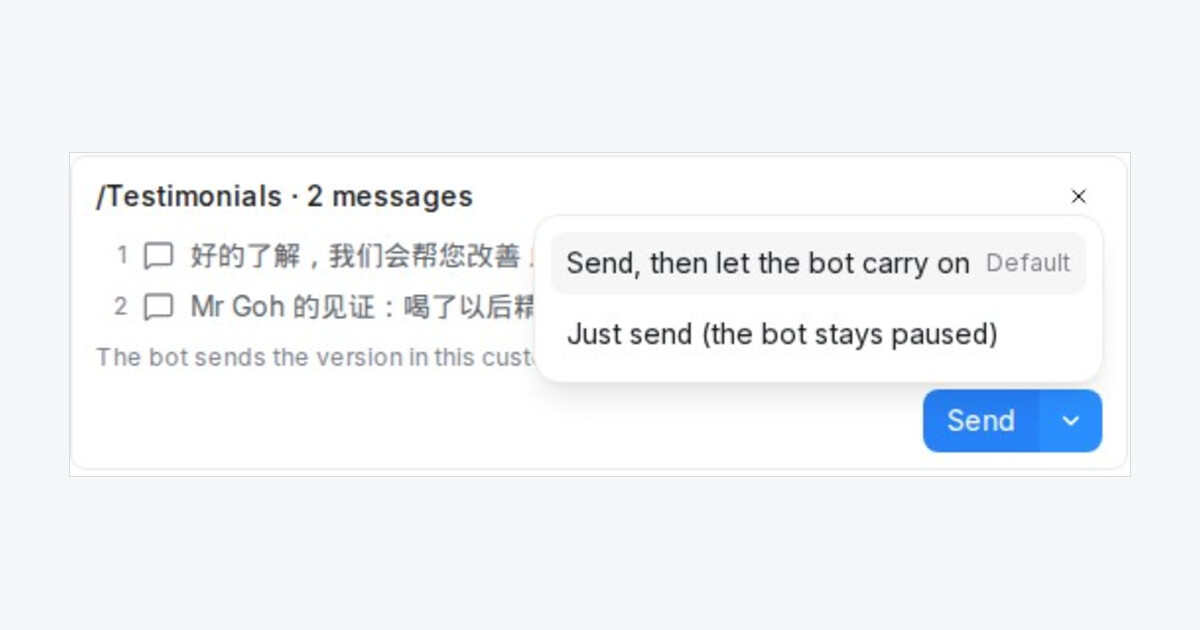
Some parts of your bot are worth sending on their own: testimonials, a price list, payment details. Your team can now send them from any chat, without copying the bot's messages into saved replies.
How do I mark a part of my bot?
- In the flow designer, click the step where the part starts and open Advanced settings.
- Switch on Staff can send this from the chat and give the part a name, such as Testimonials.
- Save and publish. The step shows a small badge with the name.
The part runs from that step up to the bot's next question. Mark a language check in front of your language versions, and each customer gets their own language.
How does my team send it?
Type / in the reply box. The marked parts show after your saved replies as From your bot. Pick one to see its messages, with answers the customer already gave filled in.
Send lets the bot send the part, ask its next question and carry on with the customer. The arrow next to it offers Just send (the bot stays paused), which sends only the part's messages and leaves the bot where it was. A note in the chat says who sent which part.